Client portal
The client portal lets a person view their own appointments and, when available, treatment plans and payments.
Invite a client
- In Clientes, check that the record is active and has a valid email.
- On that person's row, select Convidar para o portal do cliente (invite to the client portal), if your role offers that action.
- Ask the person to accept the invitation and sign in with the same email.
Make an appointment as a client
- Open the address provided by the business and sign in.
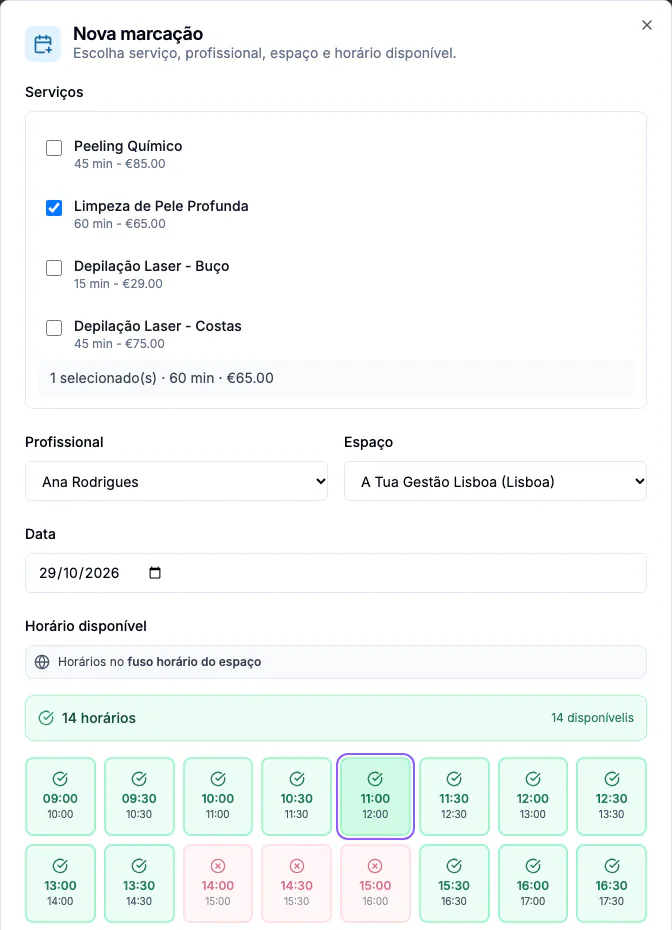
- Open Marcações (appointments) and select Nova marcação (new appointment).
- Select the services, professional, location, date and available time.
- Review the details and confirm. Find the appointment in your list.
To cancel, open the appointment and use Cancelar when available. Options depend on the workspace rules, plan and appointment status. If you cannot sign in or find a time, contact the business.
View your health record
From the menu, open Ficha de saúde (health record). Read the consent text: if you wish to authorise the described processing, select the checkbox and choose Registar consentimento (record consent). With active consent, you can complete the necessary fields and choose Guardar ficha (save record). Retirar consentimento (withdraw consent) is available on the same page. If consent cannot be recorded, contact the business.
Planos (plans) and Pagamentos (payments) may also appear in the menu, depending on the plan and available records.